Airbnb camera rules: where hosts can install them
Airbnb camera rules only allow exterior devices, fully disclosed, with no indoor monitoring. Learn where hosts can install them and how to handle footage.
By Equipe Anfitrione
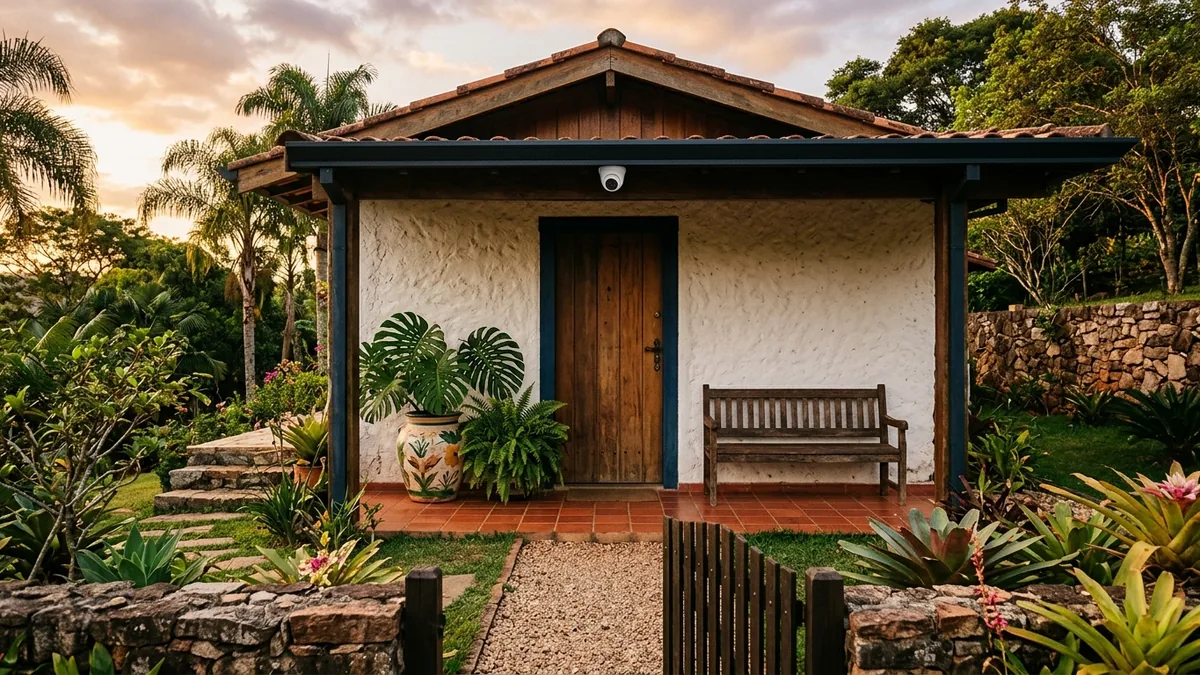
Part of the guide: How to manage an Airbnb remotely without living nearby
Anyone who manages a property from another city wants to know who came through the gate. Anyone arriving for a stay, after years of news about hidden cameras in vacation rentals, walks in looking at the ceiling. Both desires are legitimate, and the Airbnb camera rule exists so that both can fit in the same property.
The short answer: you can have a camera, only on the outside, disclosed in the listing before booking, and without monitoring any indoor space. Inside the property, none. Not even turned off, not in the hallway, not in the living room of someone renting just a room. The rule has been in effect since April 30, 2024, with a narrow exception for licensed hotels in Japan requiring entryway cameras.
There is a second part to the answer. The camera shows who was there and gives you time to act while the window is open, provided the camera itself complies with the rules.
Key Takeaways
- Indoor cameras are prohibited since 04/30/2024, even turned off and in common areas.
- Exterior cameras are allowed with the location disclosed in the listing.
- Outdoor showers and saunas cannot have cameras; pools and gates can.
- A recording can help identify responsibility, but damage requests have two 14-day clocks; evidence does not guarantee reimbursement.
- A noncompliant camera can put the listing at risk; damage to that device may be excluded. Do not infer that every unrelated claim is automatically void.
Does Airbnb allow cameras in the property?
Airbnb allows cameras on the outside and prohibits them on the inside, whether in a house, apartment, or room. The Airbnb device policy states that hosts cannot install cameras or recording devices that monitor indoor spaces, even if turned off or disconnected. The list includes hallways, bedrooms, bathrooms, living rooms, and guest houses, and hidden cameras have always been prohibited. On the outside, cameras are accepted, provided the listing states where they are. A security camera is, for Airbnb, any device that records or transmits video, images, or audio, which includes baby monitors and smart doorbells. The rule took effect on April 30, 2024, and Airbnb warned it would investigate reported violations, risking listing or account removal. As a universal rule, indoor cameras are banned, though there is a narrow exception for licensed hotels in Japan that are legally required to have entryway cameras.
The change caught more people off guard than it seems, because the previous rule was different. Until April 2024, indoor cameras in common areas of any listing, such as hallways and living rooms, were accepted if disclosed before booking, visible, and away from bedrooms and bathrooms. This is noted in the Airbnb announcement about the change from March 2024.
If you also list elsewhere, check that platform’s requirements separately, including the Booking.com guidance on surveillance devices. An Airbnb-compliant installation is not automatically compliant with every other platform or local privacy law.
Can private room hosts have cameras in the living room or hallway?
Not anymore, and this is where the 2024 rule hurt the most. The current policy extends the ban to common areas and shared spaces of private room listings, using the living room as an example. Previously, those who lived in the property and rented rooms could keep a visible camera in the hallway or kitchen, disclosed in the listing.
Get the next guides before anyone else
Practical Airbnb management and automation tips, no fluff. One email when new content drops. Unsubscribe anytime.
Two hosts asked for an exception when the change was announced. One rents each room of a nine-bedroom mansion in a tourist city in Rio de Janeiro and had cameras in the kitchen and the hallway leading to the gate. The other, in Portugal, rents two rooms in the house where she lives and kept a camera in the hallway facing the street door, after guests tried to bring strangers inside. The current text provides no exception for either case.
Common advice from that time also aged poorly. In January 2024, a host renting rooms in an apartment heard from an experienced colleague that a camera in the living room and hallway was her right, as long as it wasn't excessive. Three months later, that became a violation.
What the indoor camera did, in most of these cases, was access control. You can change the tool without filming anyone:
| Need | Alternative without indoor camera |
|---|---|
| Knowing who enters the house | doorbell with camera, disclosed |
| Stopping unannounced visitors | visitor rule in the listing |
| Recording entry and exit | smart lock with history |
| Detecting parties or noise | noise sensor, disclosed |
The smart lock records who opened the door and when, and the visitor rule written in the house rules provides the basis to act when it is broken. For the rest of the operation of those who share a roof with the guest, the guide on renting a room on Airbnb covers the agreements.
Where to place the exterior camera?
The exterior camera on Airbnb goes at the entrances and open leisure areas: gate, open garage, driveway, backyard, garden, and even the pool, always disclosed. The Airbnb page on how to disclose devices summarizes the boundary: exterior cameras are accepted as long as they do not monitor areas where the guest has a higher expectation of privacy. A higher expectation of privacy area is the outdoor space where the guest expects not to be seen, and the two official examples are the outdoor shower enclosure and the sauna. The pool is not on this list. It appears among Airbnb's own disclosure examples, alongside the garden and backyard, contrary to advice circulating among hosts to remove cameras from the leisure area.
The rule measures what the camera sees, not where it is mounted. The best example comes from a host who manages a house in another state. In March 2024, before the change, he described exterior cameras that viewed the open gourmet area, the garage, the pool, and the kitchen, which has a glass wall. Under today's rule, the kitchen in the frame is monitoring an indoor space, even with the camera mounted on the outside.
The doorbell with a camera pointed at the front door is an example permitted by Airbnb itself. The deciding detail is framing that targets the interior: a large window, a glass door, a balcony that looks inside when the door opens. The test is quick. Open doors and windows, look at the image in the app, and reframe whatever catches the living room, bedroom, or kitchen. Many pan-and-tilt cameras offer a privacy mask. A privacy mask is a fixed black cutout in the frame, and it serves to hide the side of the house.
Some cases the rule does not resolve by name: a covered gourmet area enclosed by walls, an integrated garage with a door into the house, a glass-enclosed balcony. Our reading is simple. If the guest uses that space as part of the house, treat it as indoors and do not film. If it is an open passageway, disclose it and frame it outward.
| Location | Allowed? | Care |
|---|---|---|
| Gate and driveway | yes, disclosed | do not frame windows |
| Pool and backyard | yes, disclosed | away from outdoor shower |
| Doorbell at the door | yes, disclosed | counts as a camera |
| Building hallway | yes, disclosed | depends on condominium |
| Enclosed gourmet area | our reading | if it's the house, don't film |
| Outdoor shower and sauna | no | prohibited by Airbnb |
Step-by-step to disclose the camera in the listing
Disclosing is quick and happens in two places. The first is the dedicated field, following the path Airbnb describes:
- In Listings, open the listing and go to the Listing Editor.
- Tap on Your space and then on Guest safety.
- Under Safety devices, check Presence of exterior security camera.
- Describe each camera, where it is located, and whether it is on or off.
- Save the change.
The second place is the listing description, where the policy requires stating the location with phrases like "there is a camera in the front yard." Do both. The 2024 announcement mentions disclosing presence and location before booking, and the description is what the guest reads before booking.
| Device | What to disclose | Mandatory? |
|---|---|---|
| Exterior camera | presence and location | yes |
| Doorbell camera | presence and location | yes |
| Noise sensor | presence only | yes |
| Smart assistant | presence | recommended |
The noise sensor is on the list because it can be inside the house, outside of bedrooms, bathrooms, and sleeping areas, provided it is disclosed and does not record audio. The guide on parties and guest damage explains how to use it. A sign at the entrance does not replace any of these disclosures, but it warns those who arrive by car and haven't read the entire listing.
Some skip the disclosure thinking a camera facing the street doesn't count. One host did this and, when a guest brought 16 people, wrote in the review that the street cameras had recorded the amount. She says she continued receiving reservations, and no sanctions were reported. The risk remains. The policy asks to disclose every exterior camera under your control, Airbnb says it investigates violations that reach it, and a public review admitting the camera is the kind of thing that reaches them.
Disclosing in the listing is the obligation. Repeating it in the pre-arrival message is a courtesy that prevents surprises at the door. Tools like Anfitrione reply on WhatsApp based on the property's knowledge base, so anyone asking where the cameras are receives the answer you registered, identical to the listing. The message does not replace the listing field.
What the camera solves and what it doesn't
The exterior camera answers the question "who did it" and gives you time to act, but Airbnb doesn't pay just because footage exists. Extra guests are resolved during the stay, via a reservation alteration. A reservation alteration is the change request the host sends and the guest accepts or declines. It is the right channel because the Resolution Center does not adjust guest counts, as detailed in the guide on guests who brought extra people.
Damage follows two clocks. The damage protection page requires a guest request within 14 days of checkout and a request with documents to Support within 14 days of the damage or loss. Act promptly if damage happens before checkout. A video clip showing who broke the gate serves as evidence in this request. But the camera must comply with the rules: the host protection terms exclude coverage for the device itself if it does not comply with Airbnb's Community Standards and Policies.
A host who remotely manages a house in another Brazilian state shows what the exterior camera solves and what it doesn't. In about 20 months, he listed seven damages whose authorship the exterior cameras identified, totaling BRL 17,550. Just the torn pool vinyl, BRL 13,000, is three-quarters of the total. A broken door was even filmed, and the guest swore it wasn't him. Out of everything, he says he recovered a part through AirCover and lost another, due to lack of documentation, not knowing which guest caused the damage, or because the deadline passed. This is just one host, before the current rule, not a success rate. The same list includes damaged outlets, which he attributes to guests looking for hidden cameras. It's his suspicion, but it matches the fear of those arriving.
With extra guests, one host says he sent a simple message asking about the extra people, waited a few hours with no reply, and only then sent the images. The guest admitted it and paid the nightly difference. The camera provided the proof, but the conversation resolved it. On Airbnb, the formal path for this charge is the reservation alteration, before check-out.
| Situation | What the camera does | Channel and deadline |
|---|---|---|
| Extra guest | shows how many entered | alteration, until check-out |
| Damage seen from outside | shows who did it | Center, 14 days |
| Guest denies damage | does not force payment | Airbnb review |
| Other amounts | records the fact | Center, 60 days |
One rule applies to any outcome: the recording goes to the Resolution Center, not to the review or a WhatsApp group. The Airbnb privacy page forbids publishing photos or videos of community members without permission. If the damage is indoors, the proof is different, and AirCover protection depends on the photo inspection done at every guest turnover.
How long to keep the recording?
We found no official deadline in Airbnb's rules. However, privacy and data protection laws, as well as retention requirements, vary significantly by jurisdiction. You should consult local legal counsel to ensure compliance. Operational evidence needs do not override data privacy laws; you must retain only the minimum necessary subject to local law. Airbnb claim windows are not legal retention periods. Set a lawful, proportionate deletion schedule and preserve only the relevant clip when you have a valid basis to do so. Ask a local adviser how evidence preservation and privacy obligations interact.
| Practice | Why |
|---|---|
| Record without audio | sound captures conversation, no gain |
| Access only for you | fewer people seeing the guest |
| Keep minimum necessary | comply with local privacy laws |
| Save the clip for a request | evidence until the case ends |
| Sign at the entrance | warning to those arriving |
Is it worth having a camera on Airbnb?
It is worth it on the outside, for those who operate remotely and need to know who entered. We found no public data showing a drop in bookings due to disclosed exterior cameras. The only report we have is of the host who continued receiving reservations even with the cameras mentioned in a public review: just one case, and without disclosure, which we do not recommend. It puts you within the deadline with proof in hand, and the rest is up to the Center.
For indoors, the tool is different: a disclosed noise sensor and photo inspection at every guest turnover. If you want to leave here with a list, here are five actions:
- Remove any indoor camera, even if turned off.
- Open doors and windows and check in the app what each camera sees.
- Disclose in the devices field, in the description, and on a sign at the entrance.
- Retain recordings only for the minimum time necessary according to local law.
- When facing a problem, save the clip and open the request on time, never in the review.
For information only, reflecting the rules in force on October 22, 2026. It does not replace advice from a lawyer on your specific case. See the Terms of Use.
Frequently asked questions
Does a doorbell camera filming the building hallway need to be disclosed?
Yes. For Airbnb, a smart doorbell is a recording device, and the policy specifically cites the example of a doorbell monitoring the front door and building hallway. Disclose it in the devices field and in the listing description. Installing it in the hallway, which is a common area, usually depends on HOA or building management approval.
The guest covered the exterior camera. What should I do?
Record the moment with the footage itself, notify Airbnb support, and then politely ask via chat that they uncover the camera disclosed in the listing. In one reported case, a couple covered the balcony camera, the gate camera showed no one else entered, and the check-out proceeded normally.
Does the condominium camera need to appear in the listing?
The policy requires disclosing exterior cameras under your control, and the building's camera is not. We found no Airbnb rule regarding condominium cameras. Mentioning in the description that the building has cameras in common areas takes one line and prevents surprises. The front desk footage shows who entered the building, not your unit.
Can I monitor the camera live during the stay?
Do not assume disclosure gives unlimited permission to monitor guests. Any live use must comply with Airbnb’s device policy and local privacy law, and be necessary and proportionate for a valid security purpose. Avoid following or commenting on the guest’s routine; seek local advice when the lawful scope is unclear.
I live on the same property as the rental. Can I have a camera in the common area?
Outside, yes, if disclosed. If you rent a room inside the house where you live, the ban also applies to the shared living room, kitchen, and hallway. A shared backyard between your house and the guest's, in our reading, is an exterior area: cameras are allowed, provided they are disclosed in the listing and do not frame windows.
Can the exterior camera record audio?
Airbnb’s definition includes devices that record audio, but that does not establish whether recording conversations is lawful where you host. Our practical recommendation is to disable the microphone and check local privacy and audio-recording rules before considering any exception.
Tired of answering the same questions on WhatsApp?
Anfitrione answers your guests around the clock, in your own tone of voice: check-in, Wi-Fi, local recommendations. You get the hours back, and no booking is lost to a slow reply.
Keep reading
30-Day Airbnb Stays: What Changes for Hosts
A one-month booking fills the whole calendar and looks like the deal of the year. What it changes is not the price, but everything you never wrote down before accepting.

Furnishing an Airbnb: 5 Essentials and 3 Bonuses to Wow
Before buying pillows and silverware, secure these 5 essential items for your vacation rental. They show up in reviews and directly influence occupancy.
Airbnb cleaning checklist: a room-by-room guide
The list that fits the turnover window: seven rooms with clear completion standards, the photos that become proof, and the message housekeeping sends before leaving.

Airbnb cleaning: outsource or do it yourself?
Clean the vacation rental yourself or hire a company? Learn how to decide based on cost, logistics, and the number of properties you manage.
Get new guides by email
Practical Airbnb management and automation tips, no fluff. One email when new content drops. Unsubscribe anytime.